
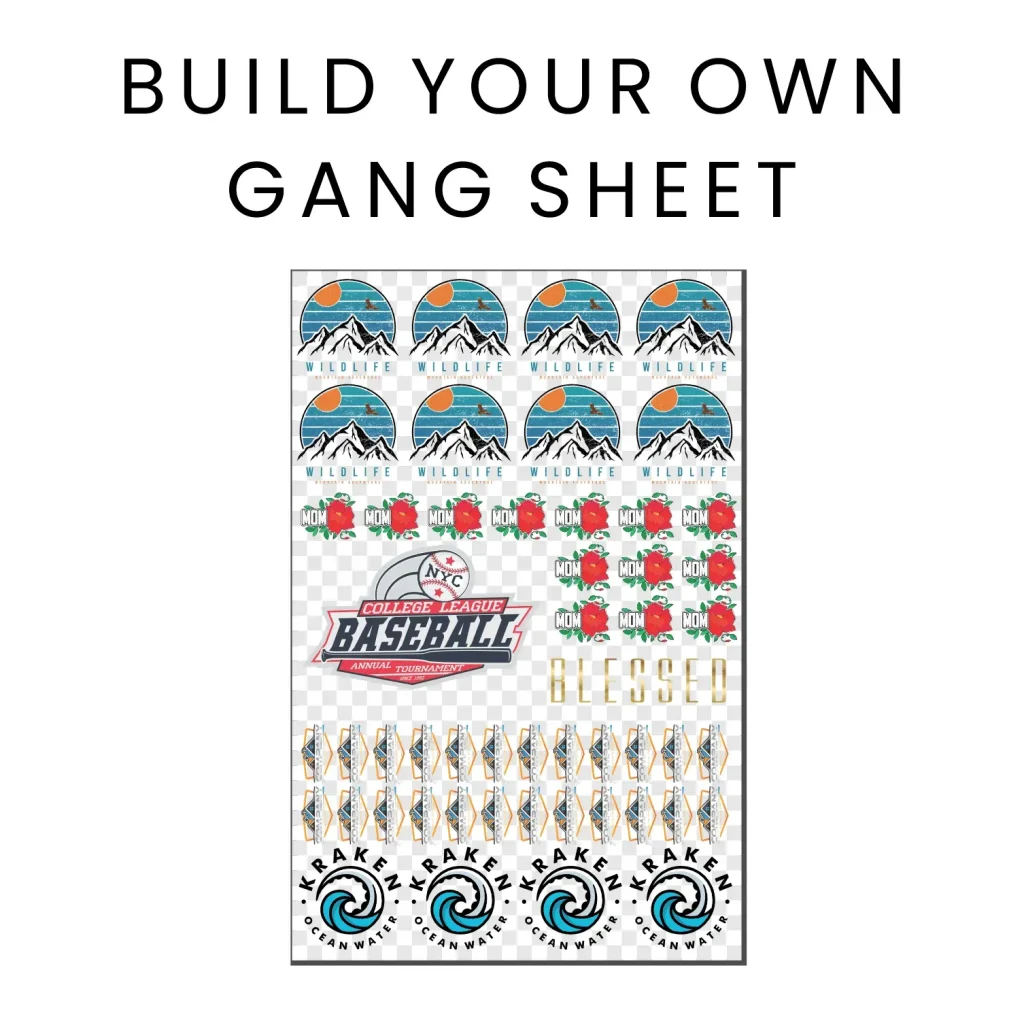
In the fast-evolving world of custom apparel printing, the DTF gangsheet builder stands out as a pivotal tool for efficiency and quality. By allowing designers to create intricate layouts that maximize ink usage, this innovative technology transforms how prints are made. When combined with DTF printing best practices, businesses can produce striking designs that resonate with customers. High-quality art files and gangsheet layout tips are essential aspects that enable designers to fully leverage the benefits of DTF printing. This blog post delves into the essentials of using a DTF gangsheet builder to elevate your custom apparel projects and streamline your creative workflow.
Whether you refer to it as a DTF layout creator or a direct-to-film design optimizer, the essence remains the same: crafting compelling and efficient designs for apparel. This method of printing has revolutionized the industry by enabling the production of vibrant, detailed graphics on fabric with ease. Emphasizing practices such as utilizing top-tier art files and strategic gangsheet arrangements ensures that your creations not only look impressive but also perform well in the marketplace. As we explore the nuances of this powerful tool, you’ll discover techniques that can help refine your DTF process and enhance your overall design strategy.
The Importance of High-Quality Art Files in DTF Printing
In the world of DTF printing, the quality of your art files can make or break your designs. High-quality art files, ideally in vector formats like .AI or .EPS, ensure that your graphics maintain clarity and sharpness even when scaled. This is particularly crucial for custom apparel printing where intricate designs must be reproduced with precision. To avoid pixelation that can ruin the aesthetic of a printed garment, it is essential to start your design workflow with high-resolution images, with a minimum of 300 DPI, thus ensuring every detail is captured accurately.
Moreover, utilizing high-quality art files facilitates a smoother printing process, as these files are optimized for color accuracy and detail. Designs that are crafted with precision not only attract the eye but also resonate with customers looking for unique apparel. Investing in quality art files is a fundamental step that contributes significantly to the overall success of your DTF printing projects, augmenting brand reputation and customer satisfaction.
Frequently Asked Questions
What are the best practices for using a DTF gangsheet builder in custom apparel printing?
To optimize the use of a DTF gangsheet builder in custom apparel printing, start by utilizing high-quality art files in vector formats like .AI or .EPS, ensuring a minimum resolution of 300 DPI. Focus on maximizing colors by using the CMYK color space to prevent unexpected shifts. Efficient gangsheet layouts should place designs closely without overlapping, and always incorporate a bleed area to avoid misalignment during the transfer process.
How can gangsheet layout tips enhance DTF printing results?
Utilizing gangsheet layout tips can greatly enhance DTF printing results by reducing material waste and speeding up the printing process. By placing designs strategically close together, you can maximize ink usage and improve workflow efficiency without compromising quality. This approach not only saves costs but also aids in producing more vibrant and intricate designs.
What role does high-quality art files play in DTF design optimization?
High-quality art files play a crucial role in DTF design optimization by ensuring clarity and sharpness in the final print. Using vector-based graphics allows for scalable designs without losing quality. Additionally, maintaining a high resolution keeps prints vibrant and visually appealing, making high-quality art files essential for successful DTF printing.
What are the key factors to consider when performing test prints with a DTF gangsheet builder?
When performing test prints with a DTF gangsheet builder, consider factors such as color accuracy, alignment, and design size. Test prints help to identify potential issues early, allowing for adjustments before the final production run. This quality assurance step ensures customer satisfaction by delivering well-crafted designs.
How can staying updated with software tools improve my DTF printing experience?
Staying updated with the latest software tools for DTF printing can significantly improve your design experience by streamlining workflows and optimizing designs for printing. Updated programs like Adobe Illustrator often include features tailored for DTF technology, providing enhanced capabilities for creating professional-grade artwork suitable for custom apparel.
What recent developments in DTF printing should I be aware of?
Recent developments in DTF printing include advancements in materials and adhesives, which enhance print durability and wash resistance. Additionally, there is a positive market trend towards eco-friendly inks and films, which aligns with consumer preferences for sustainability. Staying informed about these developments can keep your custom apparel printing business competitive.
| Key Point | Description |
|---|---|
| Introduction | Discussion of DTF printing and the importance of gangsheet builders in achieving optimal results. |
| Understanding DTF Printing | Process of printing designs onto specialized film before transferring to fabric. Ideal for vibrant and intricate designs. |
| High-Quality Art Files | Use vector graphics (.AI, .EPS) for clarity at 300 DPI to avoid pixelation. |
| Maximize Color Usage | Utilize CMYK color space to prevent color shifts and to ensure vibrant prints. |
| Gangsheet Layout Optimization | Place designs closely to minimize ink usage and printing time. |
| Design Size and Placement | Consider garment sizing and test placements for visibility and appeal. |
| Incorporate a Bleed Area | Adding a margin around designs prevents misalignment and ensures a clean finish. |
| Test Prints | Conducting previews to catch issues early, ensuring quality in final production. |
| Stay Updated with Tools | Use current software to optimize designs and improve workflow. |
| Recent Developments | Advancements in materials and eco-friendly trends mark the evolution of DTF printing. |
Summary
The DTF gangsheet builder offers a transformative advantage in custom apparel printing, enabling designers to maximize the quality and efficiency of their print processes. By understanding the DTF printing process, utilizing high-quality art files, and optimizing gangsheet layouts, businesses can significantly enhance their design results. Employing practices such as incorporating a bleed area, performing test prints, and staying informed about the latest software tools ensures a smooth transition from concept to final product. Moreover, keeping abreast of recent developments in materials and market trends solidifies a brand’s competitive edge. With dedication to these best practices, the DTF gangsheet builder can elevate apparel design to new heights, ensuring lasting customer satisfaction and impressive sales growth.